
Connect Dapper to ChatGPT
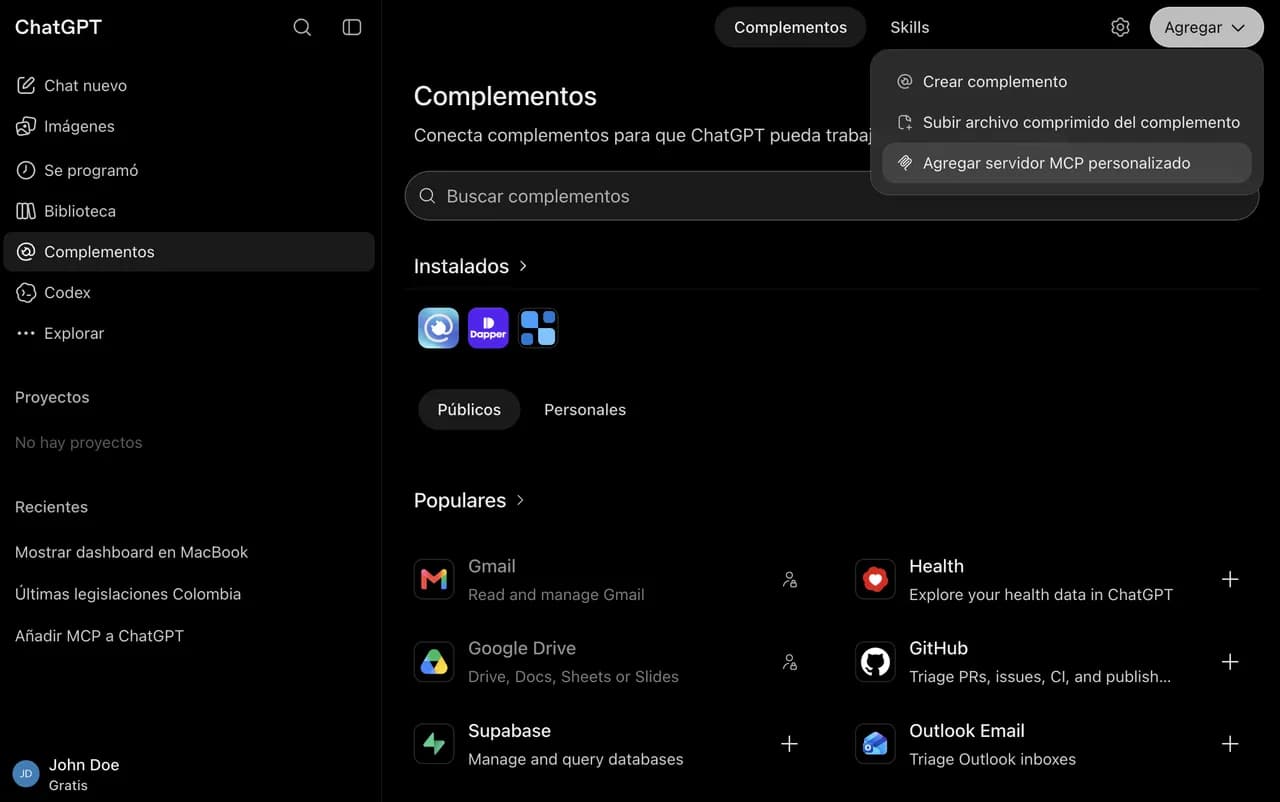
Custom MCP servers are added from Plugins, and only on the web app.
MCP endpoint
https://api.dapperglobal.com/mcpBefore you start
- Account
- Any ChatGPT account: personal or workspace (Business, Enterprise, Edu).
- Plan
- Free. A free-plan account is enough to create the plugin, connect it and use it in chat — verified on two free accounts. This was paid-plans-only until recently.
- Where it works
- chatgpt.com in the browser only — not in the mobile apps, and there is no CLI path.
- Permissions
- Nobody, on a personal account. On Business, Enterprise and Edu, custom MCP servers can be off at the workspace level and an owner turns them on from the plugin controls; until they do, the option is not in the Add menu at all.
Step by step
- 1
Add a custom MCP server
On chatgpt.com open Plugins in the sidebar, select Add in the top-right corner and choose “Add custom MCP server”. Developer mode is no longer needed. Mind the word: this is a plugin, not a connector — connectors are a different thing and do not take an MCP URL.
- 2
Fill in the plugin
Name: Dapper. Description: optional. Under Connection leave “Server URL” and paste the endpoint. Authentication: OAuth. The icon is optional, but it is what tells Dapper apart in the list later: ChatGPT takes PNG only, 256px or larger, 10 KB maximum — this file fits. Before Create you have to tick “I understand and want to continue”: ChatGPT warns that it has not reviewed the server, which is true of any third-party MCP.
https://api.dapperglobal.com/mcp Download the Dapper icon (PNG, 6 KB)
 - 3
Sign in to Dapper
On Create, ChatGPT opens “Add Dapper to ChatGPT” → Sign in with Dapper. Sign in and approve. The plugin is then bound to your Dapper account, and its detail page names the account it connected with.
- 4
Use it in a chat
In the composer select + and pick Dapper, or type @Dapper followed by your question. The answer shows when it called the tool, so you can tell an answer from Dapper's data apart from one out of the model's own memory.
Another way in
If “Add custom MCP server” isn't there
It is no longer the plan or Developer mode: the free plan has it with nothing to switch on. It is almost always a workspace where an owner hasn't enabled it yet — or you are in the mobile app, where this screen doesn't exist. Owners: the workspace's plugin controls.
These clients move their settings around often. Steps verified in September 2026 — if a menu has moved, the endpoint at the top of this page has not.